A founder can now type a paragraph into Figma Make, v0 or Google Stitch and get a clickable app in minutes. So the question we hear from buyers has changed. It used to be "how much will the design phase cost?" Now it is "do we still need a designer at all?"
Our answer: AI prototyping tools replace a real share of early design labour, and you should use them. They do not replace the person who decides what the product is. The rest of this guide explains where that line sits, what the tools cost, and how to set up a process that gets the speed without shipping a generic, fragile product.
What AI prototyping tools actually produce
The tools look similar in a demo but produce different things, and that matters more than which one generates the prettiest first screen. Prices below are from each vendor's pricing page as of November 2026.
| Tool | What you get | Best fit | Listed starting price |
|---|---|---|---|
| Figma Make | A functional prototype or web app from a prompt, with options to attach existing Figma designs, connect Supabase, publish to a URL and copy the preview back as design layers | Teams whose design system and files already live in Figma | Included with Figma seats; Professional full seat $16/month with 3,000 AI credits (Figma pricing) |
| v0 by Vercel | Generated web app code you can edit visually, sync with GitHub and deploy to Vercel | Code-first teams on React and Vercel who want a prototype engineers can read | Free tier with $5 one-time credits; Plus $30 per user/month with $30 of credits (v0 pricing) |
| Google Stitch | UI screens generated from prompts, with export to Figma | Quick visual exploration before committing to a direction | Check the Stitch site for current terms |
Two details from those pages are worth noting. Figma says the number of AI credits used "varies by request", so you cannot convert a seat into a fixed number of prompts. And v0 bills by tokens across its models, from $0.50 to $40 per million output tokens depending on the model you pick. Both mean the seat price is a floor, not a forecast. A team iterating hard on a prototype will spend more than the headline number, though for most companies it is still small next to salaries.
Export paths are not always as clean as the marketing suggests either. One plugin vendor, html.to.design, reports that Stitch's "Copy to Figma" option is not available when you generate with its Gemini 3 Pro agent. Small gaps like that are why you should test the full path (prompt, edit, export, hand-off) before you standardise on a tool.
What they genuinely replace
Being honest about the gains matters, because pretending these tools are toys is as unhelpful as pretending they are designers. In our view they now cover these jobs well enough that paying a human to do them by hand is hard to justify:
- The pitch or investor demo. A clickable flow that shows the idea used to take a designer days. Now a founder can get something convincing in an afternoon.
- Layout exploration. Asking for ten variations of a pricing page or onboarding screen costs almost nothing. A designer's time is better spent choosing between options than drawing each one.
- Stimulus for early research. A rough but realistic prototype is enough to put in front of users and learn whether the concept makes sense.
- Internal tools with few users. An admin panel used by five operations staff rarely needs a bespoke design process. A generated interface on a component library is often fine.
- Communicating requirements. A product manager can show engineers what they mean instead of describing it in a ticket. That alone removes a lot of back-and-forth.
What they don't replace
The trouble starts when the speed of the first screen is mistaken for progress on the product. Here is what a prompt does not do for you.
Deciding what to build
A tool will happily generate whatever you describe. It will not tell you that the problem you described is the wrong one, that users actually drop off two steps earlier, or that the feature should not exist. Problem framing, research and prioritisation are where most product value is won or lost, and they happen before any screen is drawn.
Structure and real data
Generated prototypes are usually built around the happy path with tidy sample data. Real products have long names, missing fields, slow networks, permissions, partial failures and empty accounts on day one. Information architecture, navigation that still works at 40 screens, and the empty, loading and error states are where designers spend much of their time, and they are rarely in a first-pass prompt result.
A system, not a set of screens
Every prompt produces a slightly different idea of a button, a card or a spacing scale. Without a designer enforcing a design system, a product assembled from generated screens drifts. That drift is cheap in a prototype and expensive in production, where every inconsistency becomes another component to build, test and maintain. Figma is clearly aware of this: its pricing page now lists "Make kits" to package a design system into reusable AI context. Someone still has to create and own that system.
Accessibility and regulated contexts
Contrast, focus order, screen reader labels and touch target sizes need checking against a standard, not eyeballing. In fintech or healthcare you also have consent flows, disclosures and audit requirements that a general-purpose generator does not know about. Treat any generated UI in those settings as unreviewed until a person has checked it.
Taste and differentiation
Models produce the most likely interface for a prompt, which tends to mean the average of what already exists. That is useful for a settings page and a problem for the parts of your product that should feel distinct. Designers themselves are cautious here. Figma's 2025 AI report, a survey of 2,500 Figma users, found 69% of designers were satisfied with AI tools and 54% said AI improved the quality of their work, compared with 82% and 68% of developers. Only 31% of designers used AI in core design work such as asset generation, against 59% of developers using it for core development tasks like code generation.
Working on something like this? See our Claude Agent Development →
Decision matrix: tool alone, tool plus designer, or designer-led
Most buyers do not need a philosophy, they need to know what to do for the project in front of them. This is the rule of thumb we use.
| Situation | Recommended setup | Why |
|---|---|---|
| Investor demo or concept pitch | AI tool alone | It only has to communicate the idea. Nobody will use it for real. |
| Internal tool, under ~20 users, low risk | AI tool on a standard component library, light design review | Consistency matters less than speed; a short review catches obvious usability problems. |
| Early validation of a new product | Designer frames the problem and runs tests; AI generates the variants | The value is in what you learn from users, and AI makes each test round cheaper. |
| Customer-facing MVP you intend to grow | Designer-led, AI-assisted | You need a design system and solid flows from day one or you pay for it in rework. |
| Redesign of an existing product with real users | Designer-led, research first | Behaviour data and existing users' habits matter more than fresh layouts. |
| Fintech, healthcare or other regulated flows | Designer-led with compliance review; AI for exploration only | Errors in disclosures, consent or data display carry real risk. |
The cost question, done properly
Comparing a $16 or $30 subscription with a designer's monthly rate is the wrong comparison. The tool and the designer are not doing the same work, so the real question is what each piece of work costs to get wrong.
Getting the demo wrong costs very little. Getting the core flow of a paid product wrong costs a lot: lower conversion, support load, and an engineering team rebuilding screens after launch. That is why we think the sensible budget split has shifted rather than disappeared. Spend less on drawing screens by hand, because AI now does that cheaply. Spend the same or more on research, flow design, the design system and usability testing, because those are what the tools cannot do. If you want a baseline for what a design phase typically involves, our guide to how much product design costs breaks down the main line items.
One more hidden cost: the demo trap. A polished generated prototype makes a product look 80% done when the hard engineering has not started. Stakeholders anchor on it, timelines get compressed, and the team is pushed to ship the prototype rather than build the product. We covered the same pattern for full app builders in Lovable vs custom development, and it applies just as much to design-side tools.
A workflow that gets the speed without the mess
Here is the process we recommend to teams adopting AI prototyping tools. It keeps a person accountable for decisions and uses the tools where they are strongest.
- Frame the problem before prompting. Write down who the user is, the job they are trying to get done, the success metric and the constraints. A one-page brief makes every later prompt better and gives you something to judge outputs against.
- Map the flow, not the screens. Sketch the steps, decisions and states, including empty, error and permission cases. This is the part generators skip, so do it by hand.
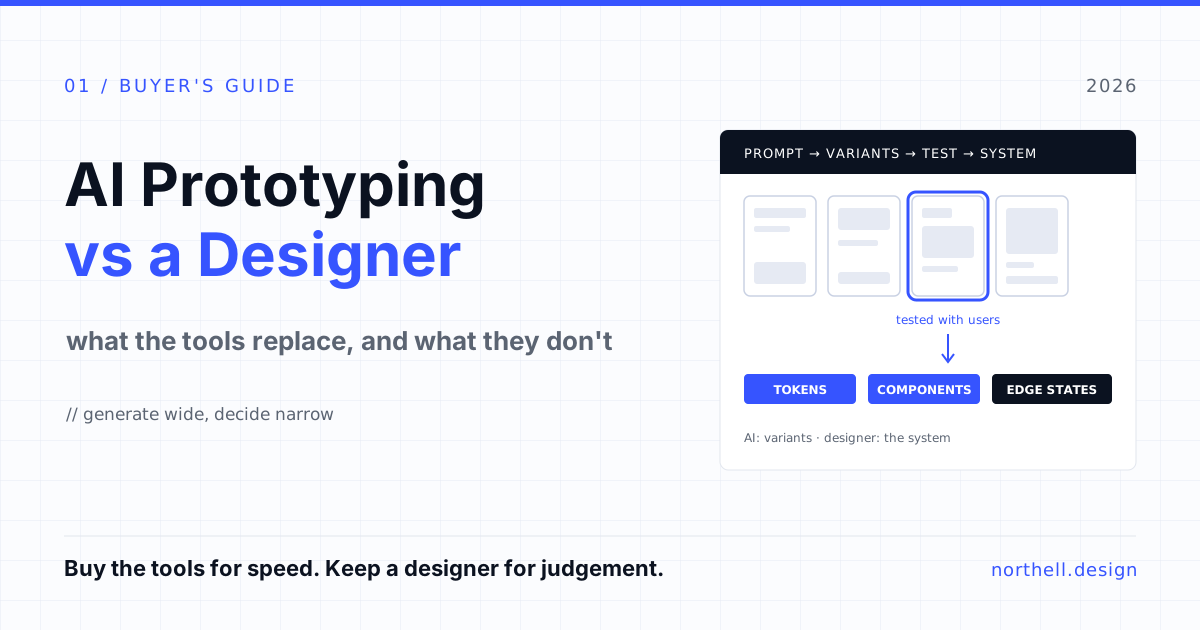
- Generate wide. Use Figma Make, v0 or Stitch to produce several directions for the key screens. Set a time box; the goal is options, not polish.
- Test with real users early. Put the two or three strongest directions in front of users. Nielsen Norman Group's guidance is that a study with five participants finds about 85% of usability problems, and that many small tests beat one big one. Cheap prototypes make that rhythm affordable.
- Consolidate into a system. A designer turns the winning direction into components, tokens and patterns that cover every state in the flow map. This is where generated screens become a product.
- Hand off deliberately. Agree which generated code, if any, engineers will reuse. Usually it is components and visual reference, not architecture. Document it so nobody mistakes the prototype for the build.
- Keep testing after launch. Use analytics and periodic usability reviews to find where the real product diverges from what the prototype promised.
How to choose a tool for your team
If you have decided to adopt one, judge it on the path from prompt to production rather than the first output. Four questions sort most teams quickly:
- Where does the output need to go? If designers own the next step, a tool that writes back into Figma reduces friction. If engineers do, readable code in your stack matters more.
- Can it use your design system? Generic output is fine for exploration; for anything near production, the tool should work from your components and tokens.
- What happens to your data? Check training and retention terms per plan. v0, for instance, lists training opt-out by default only from its Business plan upward. Use synthetic data in prototypes regardless.
- How predictable is the spend? Credit and token pricing scales with iteration. Set a monthly cap per seat and review usage after the first month.
If you are also designing AI features into the product itself, the trust and transparency patterns in how to design UX for AI features are a useful companion to this guide.
Our take
AI prototyping tools are a real improvement, and teams that refuse to use them will be slower for no good reason. But they have moved the bottleneck rather than removed it. Producing screens is no longer the hard part. Knowing which screens to produce, making them work with real data and real people, and keeping them coherent as the product grows is still skilled work. Buy the tools for speed. Keep a designer for judgement.
How Northell can help
Our UI/UX design team works the way this guide describes: research and flow design first, AI tools to explore and test faster, and a design system engineers can build from. If you have an AI-generated prototype and want an honest view of what it would take to turn it into a real product, or you want to set up a faster design process for your team, get in touch.