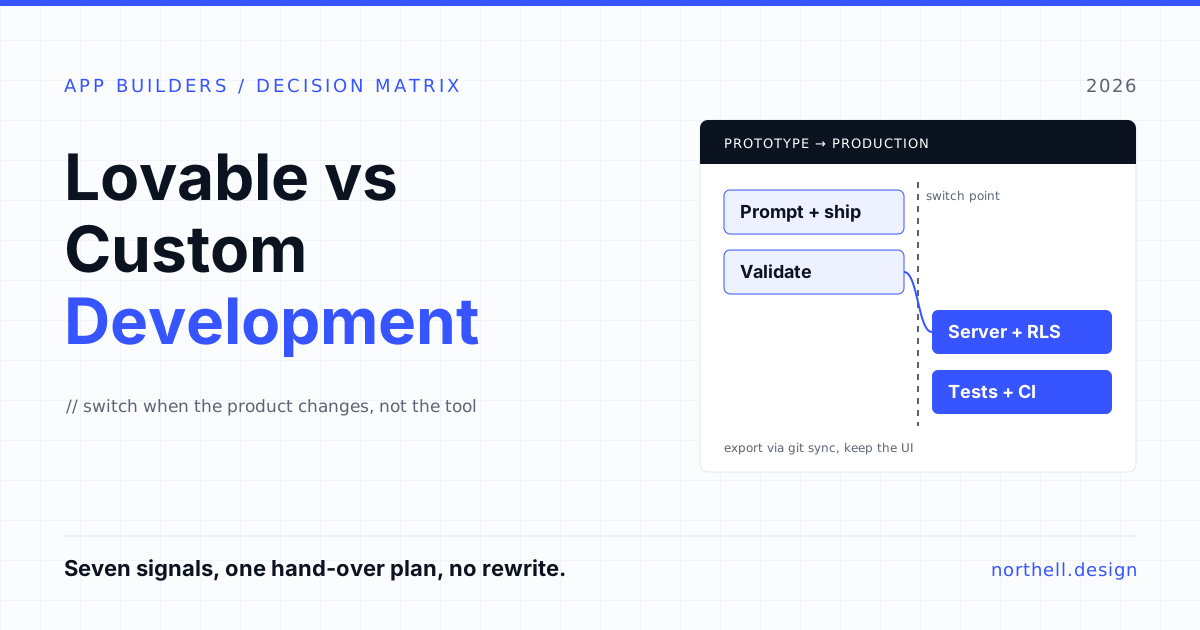
Most founders who ask us about Lovable are not asking whether it works. It clearly does: you describe an app, and a few minutes later you have a working web product with a login screen, a database and a URL you can send to customers. The real question comes a few months later, when the prototype has users, the prompts are getting longer, and every fix seems to break something else. Is this still the right tool, or is it time for custom development?
Our view is simple. Lovable is an excellent way to find out what to build. It is a weaker way to own what you have built once that thing carries real data, real money or real promises to customers. This guide covers where the line sits, the signals that you have crossed it, and how to move without throwing away the work.
What Lovable is good at (and it is good at a lot)
Lovable is an AI app builder for the web. You chat, it writes and edits the code, and it can host the result. According to Lovable's FAQ, every project uses the same stack: TanStack Start for apps created from 13 May 2026, React and Vite for older apps, and a PostgreSQL database through Lovable Cloud or Supabase. That matters, because it means the output is ordinary web code, not a proprietary format.
The economics are hard to argue with. On Lovable's pricing page, Pro costs $25 a month with 100 credits and Business costs $50 a month with 100 credits, both with unlimited users. The same page gives example costs: "make the button gray" at 0.5 credits, adding authentication with sign-up and login at 1.2 credits, and a landing page with generated images at 1.7 credits. Hosting for smaller apps is, in Lovable's words, mostly covered by the grant included with a subscription.
So for these jobs, Lovable is often the best option available:
- Validating demand. A clickable, working product you can put in front of ten customers this week beats a specification document every time.
- Design exploration. Trying three versions of an onboarding flow in an afternoon used to need a designer and a developer. Now it needs one person with taste.
- Internal tools with low-risk data. A dashboard that reads from a spreadsheet, a request form, an admin page for five people.
- Investor and sales demos. Something real to click through, rather than slides.
If your app sits in one of those boxes and is staying there, you probably do not need us or anyone like us. Keep building.
Where it starts to strain
The problems do not show up on day one. They show up when the app crosses from "a thing we are testing" to "a thing people depend on". Three patterns come up again and again.
1. Security depends on settings most builders never look at
A Lovable app with a Supabase backend typically lets the browser talk to the database directly, using a public key, and relies on Postgres row-level security (RLS) policies to decide who can see which rows. That is a legitimate architecture, but it puts all the weight on those policies being right.
In March 2025, security researcher Matt Palmer found that they often were not. His write-up of CVE-2025-48757 describes how Lovable projects created on or before 15 April 2025 (and possibly later) could be deployed with missing or insufficient RLS, letting unauthenticated attackers read, and sometimes write, arbitrary tables. The exposed data included user records, third-party API keys and payment status fields. The NVD entry carries the same description.
It was not a one-off. Escape's research team scanned more than 5,600 public vibe-coded apps, around 4,000 of them built on Lovable, and reported more than 2,000 vulnerabilities, over 400 exposed secrets and 175 instances of personal data, including medical records and IBANs. They ran the scans in a passive, non-destructive mode and describe the numbers as a lower bound.
Lovable has since added a publish-time RLS check and, on its pricing page, a security center for Business plans. Those help. They do not replace someone who understands your data model asking, table by table, "who should be able to read this row?"
2. Business logic ends up living in prompts
Early on, the prompt history is the specification. "Only managers can approve refunds over $500" goes into the chat, and the AI writes code that roughly does that, somewhere. Six months later nobody can say where the rule lives, whether it is enforced on the server or only hidden in the interface, or whether the last change quietly broke it.
This is the core weakness of building by conversation. There are no tests, so there is no way to prove a rule still holds after the next edit. That is fine for a prototype. It is not fine for pricing, permissions, billing or anything a customer contract depends on.
3. The tool assumes one driver
Lovable's GitHub integration is genuinely useful: two-way sync, branches, pull requests. But its own documentation lists the constraints. Lovable edits and syncs one branch at a time. Git sync always creates a new repository rather than connecting to one you already have. When Lovable and GitHub diverge, Lovable pushes its changes to a separate lovable-sync branch for someone to merge, and a later push from GitHub can replace Lovable's version of the branch. Lovable also cannot edit files larger than 10 MB.
None of these is a flaw on its own. Together they mean that the moment a second developer, a code review process or a CI pipeline enters the picture, you need clear rules about who is allowed to change what, and where.
Lovable vs custom development: a decision matrix
Here is how we would compare the two for the decisions that actually come up. "Custom" here means a development team writing and owning the code, which may still start from your Lovable codebase.
| Factor | Lovable | Custom development |
|---|---|---|
| Time to first working version | Hours to days | Weeks |
| Cost to start | $0 to $50 a month in plan fees, plus your time | Team time from day one |
| Security model | Usually browser-to-database with RLS; correct only if policies are right | Server-side checks, reviewed policies, penetration testing where needed |
| Business rules | Described in prompts, rarely tested | Written as code with automated tests |
| Team workflow | Best with one main editor; one synced branch | Branches, reviews, CI/CD, multiple developers |
| Integrations | Good for common APIs and connectors | Any system, including legacy, on-premise and message queues |
| Mobile | Web apps | Native iOS and Android or cross-platform |
| Compliance evidence (SOC 2, HIPAA, PCI) | You still have to produce it for your app | Designed into the architecture and process |
| Code ownership | Yours, exportable via download or Git sync | Yours, in your repository from the start |
The pattern is clear. Lovable wins on speed and starting cost. Custom development wins on everything that becomes expensive to get wrong later.
Working on something like this? See our Custom Software for Startups →
Seven signals it is time to move on
You do not need all seven. Any two of these, and you should at least get an engineer to review the codebase.
- You store data that would hurt if it leaked. Health records, financial details, identity documents, children's data, or anything covered by GDPR special categories. This is the strongest signal on the list.
- Permissions have more than two levels. Admins, managers, members, guests, per-organisation access, per-record sharing. Every new role multiplies the RLS policies that have to be right.
- A second person needs to write code. As soon as a developer joins, you need a branching and review model, and the one-branch sync becomes a coordination problem.
- You need serious integrations. ERP, payment flows with webhooks and retries, EHR systems, a legacy SOAP service, scheduled jobs that must not run twice. These belong on a server you control.
- A customer or investor asks for compliance evidence. A security questionnaire, a SOC 2 report, a HIPAA business associate agreement. Lovable's own certifications cover Lovable, not the app you built on it.
- You need a native mobile app. Lovable builds for the web. If the product needs offline mode, push notifications that work reliably, or App Store distribution, plan for a mobile build.
- Fixes keep breaking other things. If you are spending more credits and more evenings undoing regressions than adding features, the codebase has outgrown conversational editing. Credit spend is the visible symptom; the missing tests are the cause.
The cost question, honestly
It is tempting to frame this as $25 a month against a development team's invoice. That comparison is real, and it is why you should absolutely start in Lovable. But it hides two costs.
The first is the founder's time. Credits are cheap; the hours spent describing, testing and re-describing a fix are not. Lovable's pricing page notes that monthly credits expire two months after they are issued and are not refundable, which tells you the model is designed around steady building, not around one-off fixes.
The second is the cost of the database and the infrastructure once the app is real. If you run on your own Supabase project, Supabase's pricing lists a free tier that pauses projects after a week of inactivity, a Pro plan from $25 a month, and a Team plan from $599 a month. Lovable says apps with significant traffic or size start drawing on your credit balance for hosting. Neither is expensive for a small product. Both are reasons to know exactly where your production data lives and who pays for it.
For a realistic view of what custom work costs, our guide to the cost of outsourcing software development breaks down how rates and team shapes affect the total. The useful framing is not "Lovable or a team" but "how much of the existing code can a team keep".
How to move from Lovable to a custom build without a rewrite
A full rewrite is the most expensive way to leave a prototype tool, and usually the wrong one. You have already paid for something valuable: a working interface that users have tested. Here is the sequence we recommend.
- Freeze and export. Connect the project to GitHub through Git sync, or download the codebase. Tag the current state. From here on, production changes go through pull requests.
- Audit the data layer first. List every table, who should read and write each one, and what the current RLS policies actually allow. Test as an anonymous user and as a user trying to reach someone else's records. This is where the expensive surprises hide.
- Move sensitive operations to the server. Payments, permission changes, anything involving secrets or other users' data. Supabase Edge Functions, a small API service, or server functions in the existing framework all work. The goal is that the browser no longer decides who sees what.
- Write tests for the rules that matter. Start with the ones that would cost money or trust if broken: billing, access control, data deletion. Wire them into CI so every change, human or AI, has to pass.
- Clean up, do not repaint. Generated code often has duplicated components and inconsistent state handling. Consolidate the design system and the data-fetching layer. Leave screens that work alone.
- Decide Lovable's new job. Many teams keep it for prototyping new features on a separate project or branch, then hand the validated design to engineers. That keeps the speed without letting unreviewed changes into production.
If the audit in step two shows the data model itself is wrong for where the product is heading, for example single-tenant tables in what now needs to be a multi-tenant SaaS, that is the one case where rebuilding the backend makes sense. Even then, the front end can usually stay. Our SaaS development work often starts from exactly this point.
A middle path many teams miss
The choice is not binary. The most efficient setup we see is a split: product people keep using AI builders to explore, and engineers own the production system. Lovable becomes the place where ideas get tested in hours, and the real codebase is where the validated ones land with tests and review.
This also changes what you hire for. You do not need a team to build screens from scratch. You need people who can read generated code critically, design a data model that will hold up, and put guardrails in place. That is closer to an MVP development engagement focused on hardening than a classic greenfield project, and it is usually smaller than founders expect.
Our take
Start in Lovable. Seriously. The cost of finding out that nobody wants your product should be measured in weekends, not in months of engineering. Our longer guide to MVP development for startups makes the same argument for validating before building.
But treat the move to custom development as a decision about the product, not the tool. When the app starts holding data that matters, rules that matter and users who would leave if it broke, it needs an owner who can read the code, prove it works and answer for it. That moment usually arrives earlier than the bug count suggests.
If you have a Lovable app and are not sure which side of the line it sits on, Northell can review the codebase and database policies and tell you what to keep, what to harden and what, if anything, to rebuild. Get in touch and send us the repository.